Session History Diagrams in Firefox DevTools
I’ve spent a lot of time at Mozilla working on session history, the machinery that keeps track of where you’ve been so the back and forward buttons do something sensible. It’s one of those parts of the browser that sounds simple from the outside and turns out to be anything but. Once you add iframes, nested iframes, and the subtle rules about when a navigation creates a new entry versus replacing the current one, the state you’re reasoning about gets large and hard to hold in your head.
For years my main tool for understanding that state was reading code and printing things to a log. That works, but it’s slow, and it never quite shows you the shape of the thing. So I built a way to see it: a new DevTools panel in Firefox Nightly called Session History Diagrams.
Enabling it
The panel is available in Firefox today, behind a pref. It’s been there in some form since Firefox 150, growing more stable with each release. To turn it on, set devtools.application.sessionHistory.enabled to true in about:config, then reload DevTools. The new panel lives under the Application tab, next to Service Workers and Manifest, and it draws the browser’s session history as a diagram that updates as you navigate.
Since Firefox 153 it also works over remote debugging. Connect to a device from about:debugging and you can watch the session history of a page running on Android, the same as you would on the desktop.
Jake diagrams
I didn’t invent the idea of drawing this. The HTML spec already has a notation for it, called a Jake diagram after Jake Archibald, and that’s where I started. It’s a tabular notation where columns represent steps in session history, and rows represent navigables (the top-level browsing context plus any iframes). Background colors identify documents, a fresh color marking a new document loaded in that navigable, and the current step is shown in bold. It’s a genuinely useful way to capture multi-navigable interactions that are otherwise hard to describe in prose.
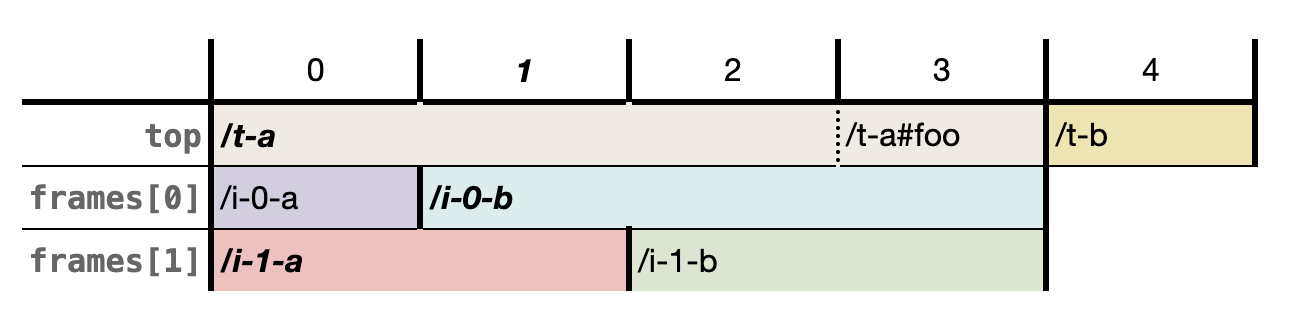
These diagrams don’t have to be drawn by hand. Domenic Denicola, one of the HTML spec editors, built a Jake diagram generator that turns a description of a navigation sequence into a rendered diagram. That’s where I first started playing with a more dynamic approach to the visualization. The thing I missed the most was being able to build a history up step by step rather than describe a finished sequence all at once. So I wrote rejake, a small tool that draws diagrams in the same style1, but lets you construct the history one step at a time.
But rejake, like the spec’s diagrams and Domenic’s generator before it, was stuck with a limitation the spec itself admits to, that they only work with a single level of nesting. That was exactly my problem. Real pages nest iframes inside iframes, and the bugs I was chasing usually lived down in that deeper nesting, precisely where the diagram stops being able to help. And however I drew them, I was still typing the history out by hand. It’s a short step from there to wanting the diagram to draw itself from the browser’s actual session history instead2.
Firefox Session History Diagrams
So the panel extends Jake diagrams to handle arbitrary nesting. Every column is a step in the session history. Every row is a frame, listed in pre-order from the frame tree: top-level document first, then its first iframe, then that iframe’s children, and so on. The current entry is highlighted in blue, and the diagram updates live as you navigate.
The recording above is an ordinary bit of browsing, a handful of pages visited one after another. The top row tracks the page you’re actually looking at, and the current position is the one in blue. The interesting part is everything underneath that top row.
Some of those pages didn’t just load a single document. They pulled in nested frames of their own, and the diagram stacks those below the page that owns them. None of that is visible in the address bar or anywhere in the page chrome, and the frames come and go as you move through the history. Normally you’d have no way of knowing they were ever there. Here you can read straight off the diagram which frames a given step carried, when each one entered, and when it dropped away again.
Who else might want this
I built this for myself, working on Gecko’s session history internals, where being able to watch the diagram change while reproducing a bug turns opaque state into something I can point at. But it turns out I’m not the only one who hits this wall. Plenty of people working elsewhere in Gecko, anywhere near navigation, end up reasoning about the same state, and now we all share one picture of it.
If you build single-page applications, or work with the History API or Navigation API, you’ve probably run into the same kind of confusion from the other side. A push where you expected a replace, a missing history entry, an iframe that accumulated entries unexpectedly. These are hard to reason about without seeing the state directly, and that’s exactly what the diagram gives you.
Session history isn’t a Firefox-specific problem either. Every engine implements the same part of the HTML spec, and Jake diagrams come from that shared spec. The panel only ever shows Firefox’s state, but the rules are the same everywhere, so if you work on another engine it can still be a useful reference for how one implementation behaves. It’s often the only practical way to surface an interoperability difference, which might be a bug in any of the engines, but stays hidden until you can actually see it.
Thanks
A big thanks to Nicolas Chevobbe, whose assistance was invaluable in getting the DevTools integration right. The work, including what’s still to come, is tracked in Bug 2015726. There’s a fair bit still on that list, like marking whether a step was a push or a replace, surfacing back/forward cache state, tying the diagram into the Network and Inspector panels, and more, all heading toward fuller DevTools support for Navigation and Session History.
Notes
-
Which, naturally, meant re-implementing the whole of Session History along the way. ↩
-
Getting nerd-sniped by Jan Jaeschke definitely contributed as well. ↩